Know where you stand before the market moves
See every commitment and your exposure in one view. Hedge inside ReSpark through our partnership with Pillar, or connect the CTRM you already use.
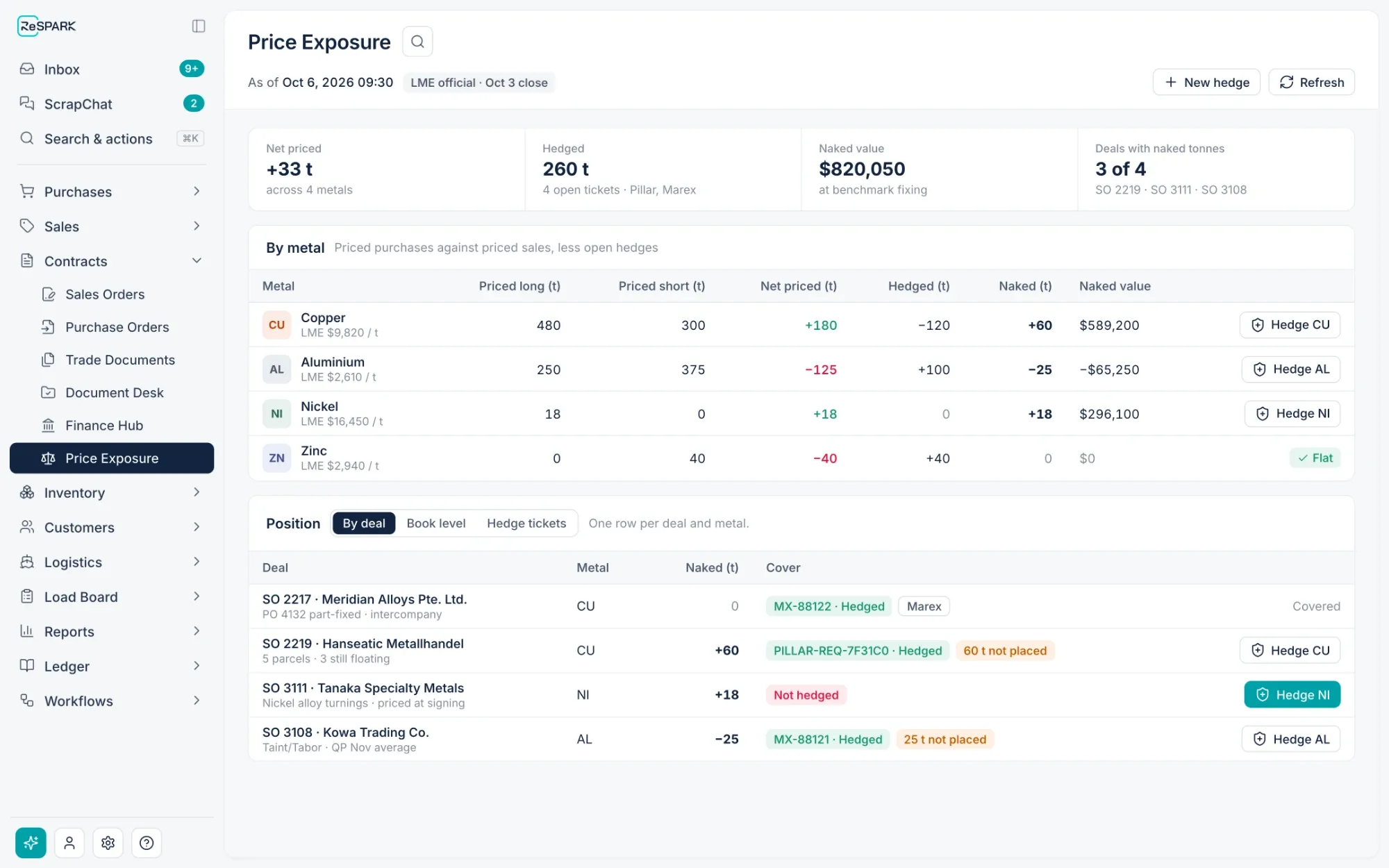
What ReSpark changes about position and hedging
The old way creates work. ReSpark replaces it.
Everything a trade desk needs to see.
Every open deal on one screen.
- Purchase and sale commitments side by side
- Filter by commodity, counterparty, or shipment period
- Open each deal to see its contract, shipments, and invoices
Know whether you are long or short, and by how much.
- Position for each commodity, updated as contracts change
- Committed, shipped, and invoiced quantities
- Totals across every trading entity
See what a price move would mean.
- Exposure calculated from live contracts
- Priced and unpriced quantities shown separately
- Linked purchase and sales contracts shown together
Place and manage hedges without leaving ReSpark.
- Hedge execution inside ReSpark, through our partnership with Pillar
- Hedges shown next to the physical deals they cover
- No file uploads or manual handoffs
Keep the risk system you already have.
- Physical deals and positions flow to your CTRM automatically
- Prices come back onto the contract
- A log of everything sent and received
Give leadership the numbers without building a spreadsheet.
- Position and exposure dashboards
- Reports straight into Power BI
- The same numbers the desk is working from
One physical book. One hedge book. One position.
ReSpark runs the physical trade. Pillar runs hedge execution and risk. Connected in both directions, they show physical exposure and hedge cover side by side, per contract and by commodity, without re-keying a tonne. Already run a CTRM? Trade connects to it the same way.
- Sales and purchase contracts, linked into deals
- Price fixings agreed with customers and suppliers
- Shipments, bills of lading, assays, and payable metal
- Benchmarks, QP, and provisional and final settlement
- Physical exposure per contract, metal, and QP month
- Orders and fills with your brokers
- Hedge cover by book, metal, and period
- Mark-to-market, realized and unrealized P&L
- Margin and marked positions
- Trader workflow, alerts, and approvals
- ReSpark → Pillar: Deals, fixings, shipment pricing, and exposure, as they change
- Pillar → ReSpark: Orders, confirmed fills, allocations, and P&L, on the deal they cover
A fixing is not a hedge
A price agreed with a customer or supplier is a physical event and lives in ReSpark. A hedge placed with a broker is a financial event and lives in Pillar. Neither is ever counted as the other, so the uncovered tonnage your team sees is always the true number.
A deal, end to end
- 01ReSpark
Deal opened
A sale is linked to its purchases and appears in Pillar with both legs.
- 02Both
Shipment planned
Timing and tonnes sharpen the position in both platforms.
- 03ReSpark
B/L priced
The provisional price and QP take effect on the shipment.
- 04ReSpark
Price fixed
A customer or supplier fixing moves tonnes from unfixed to fixed.
- 05Pillar
Exposure updated
Pillar refreshes the book, metal, month, and deal views.
- 06Pillar
Hedge placed
The trader executes; orders and fills are managed in Pillar.
- 07Both
Fill allocated
The confirmed fill lands on the deal as cover in ReSpark.
- 08Both
Final settlement
Outturn assay and QP average close the price; Pillar closes or rolls the position.
Built to reconcile
One owner for every fact
Physical terms and settlement belong to ReSpark; orders, fills, and market values to Pillar. Neither overwrites the other.
Every tonne accounted for
Allocations are checked against deal, metal, and direction, and never exceed the confirmed fill.
Nothing written over
Corrections and reversals are added with their reason and time. The original record remains.
Same benchmarks, same calendar
Contracts and hedges reference the same benchmark, exchange, averaging method, and holiday calendar.
Frequently asked questions.
Can we place hedges from inside ReSpark?
Yes. Hedges are placed and managed inside ReSpark through our partnership with Pillar.
We already have a CTRM. Can we keep it?
Yes. Trade sends physical deals and positions to the CTRM you already use, and brings prices back onto the contract.
How current is the position?
Position updates as contracts, shipments, and invoices change. Nobody has to pull it together by hand.
Can we see physical deals and hedges together?
Yes. Hedges are shown next to the physical deals they cover, so the desk sees one picture.
Can leadership see position without logging in to the trade desk?
Yes. Position and exposure are available on dashboards and in Power BI.
Trade & Export
Trade & Export
Container bookings, bulk vessels, trade documents, contracts, and hedging in one system, working next to the ERP you already run.
Contracts and Payments
Pricing, invoices & LCs
Container Exports
Bookings, cutoffs & tracking
Bulk Shipping
Voyages, laytime & freight
AI Document Intelligence
Documents read & checked